Python vs C/C++ vs Assembly side-by-side comparison
Python vs C/C++ vs Assembly side-by-side comparison
Channel: xmdi
Duration: 01:01
URL: https://www.youtube.com/watch?v=3PcIJKd1PKU
Processed: 2026-07-07
Frames analyzed: 8 unique content frames
[00:00 - 00:06] Section 1
Visual Context
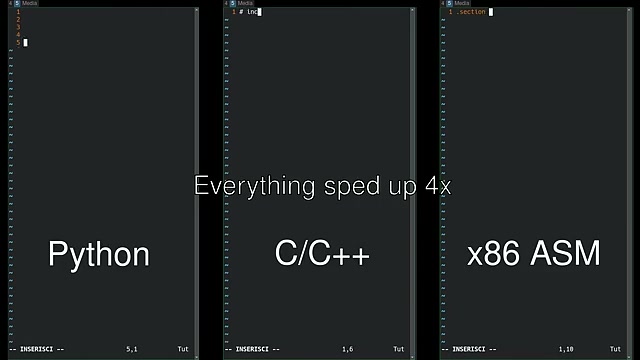
[Visual Description]: The frame shows a tripartite layout displaying three vertical terminal windows, all running a text editor (likely Vim) in a dark theme. The left panel is labeled "Python" at the bottom. The center panel contains the text "Everything sped up 4x" in the middle and "C/C++" at the bottom. The right panel is labeled "x86 ASM" at the bottom. Each panel shows line numbers 1 through 5, with the cursor active on line 5. All three panels show "-- INSERISCI --" in the bottom status line, indicating Insert mode.
[00:06 - 00:15] Section 2
Visual Context
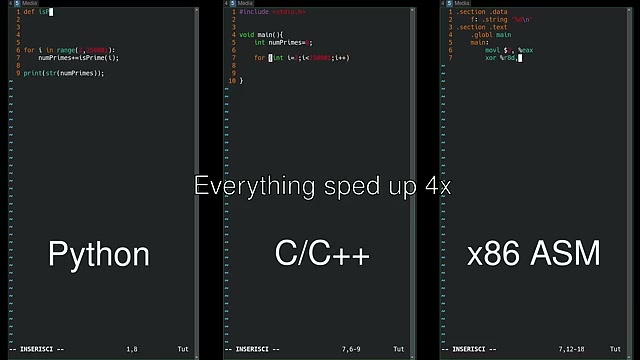
[Visual Description]: The three-panel layout continues, with code now written in each: - Left (Python):
def isPrime(n):followed byfor i in range(2, 250000):,numPrimes+=isPrime(i);, andprint(str(numPrimes));. - Center (C/C++): Includes#include <stdio.h>,void main(){,int numPrimes=0;, and aforloopfor (int i=2; i<250000; i++). - Right (x86 ASM): Shows.section .data,f: .string "%d\n",.section .text,.globl main,main:,movl $0, %eax, andxor %r8d. - Metadata remains: "Everything sped up 4x" in the center and the headers "Python", "C/C++", "x86 ASM" at the bottom.
[00:15 - 00:21] Section 3
Visual Context
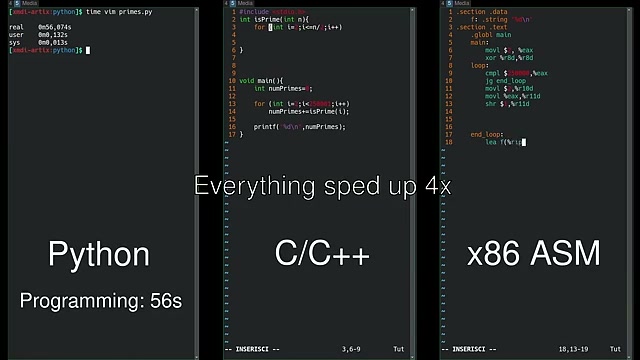
[Visual Description]: The terminal windows are now populated with execution timings and additional code logic: - Left (Python): Output shows
time vim primes.py,real 0m56,074s,user 0m0,132s,sys 0m0,013s. Text below: "Python", "Programming: 56s". - Center (C/C++): Displaysint isPrime(int n){and aforloop. - Right (x86 ASM): Shows further assembly code, includingcmpl $250000, %eax,jg end_loop,movl $1, %r10d,movl %eax, %r11d,shr $1, %r11d, andlea f(%rip).
[00:21 - 00:36] Section 4
Visual Context
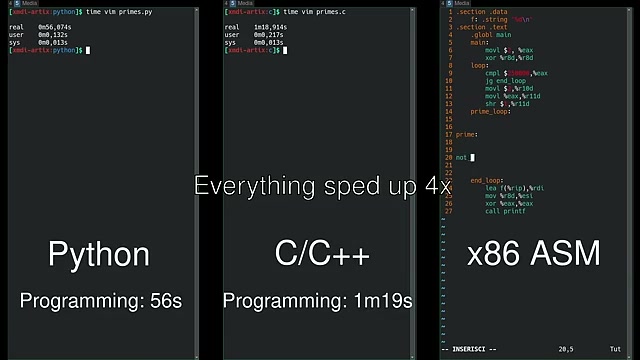
[Visual Description]: The terminal windows show progress in timing and compilation: - Left (Python): Same status as Frame 3. - Center (C/C++): Output shows
time vim primes.c,real 1m18,914s,user 0m0,217s,sys 0m0,013s. Text below: "C/C++", "Programming: 1m19s". - Right (x86 ASM): Includes code lines forprime:,not,end_loop:,lea f(%rip), %rdi,mov %r8d, %esi,xor %eax, %eax, andcall printf.
[00:36 - 00:42] Section 5
Visual Context
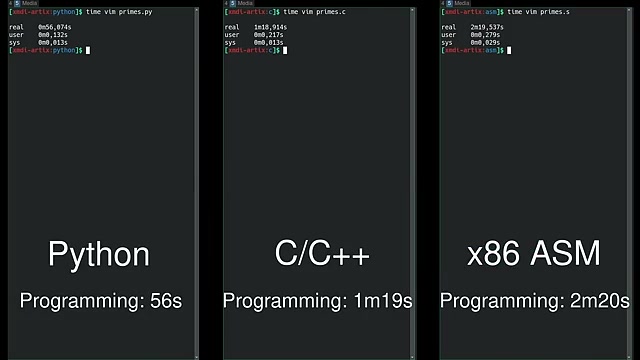
[Visual Description]: The three columns now show programming times: - Left: "Python", "Programming: 56s". - Center: "C/C++", "Programming: 1m19s". - Right: "x86 ASM", "Programming: 2m20s". The terminal output shows
time vim primes.s,real 2m19,537s,user 0m0,279s,sys 0m0,029s.
[00:42 - 00:45] Section 6
Visual Context
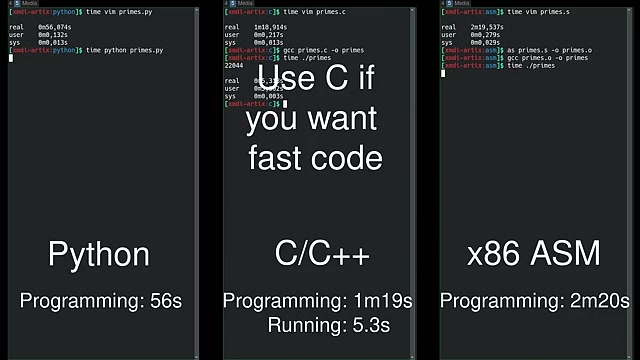
[Visual Description]: Runtime benchmarks are introduced for C/C++: - Left: "Python", "Programming: 56s". - Center: Adds text "Use C if you want fast code". Output shows
gcc primes.c -o primes,time ./primes,22044,real 0m5,312s. Final summary: "C/C++", "Programming: 1m19s", "Running: 5.3s". - Right: "x86 ASM", "Programming: 2m20s". Output showsas primes.s -o primes.o,gcc primes.o -o primes,time ./primes.
[00:45 - 00:54] Section 7
Visual Context
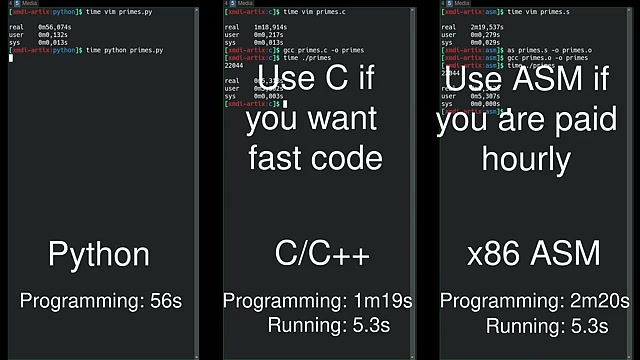
[Visual Description]: Runtime benchmarks are added for Assembly: - Left: "Python", "Programming: 56s". - Center: "Use C if you want fast code", "C/C++", "Programming: 1m19s", "Running: 5.3s". - Right: Adds text "Use ASM if you are paid hourly". Adds "Running: 5.3s" below "Programming: 2m20s".
[00:54 - 01:01] Section 8
Visual Context
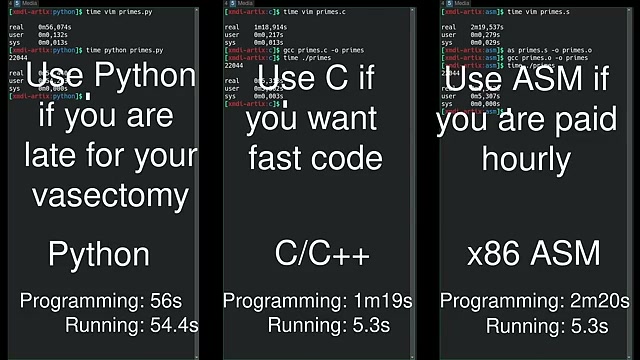
[Visual Description]: Final humorous text overlays are added: - Left: Adds "Use Python if you are late for your vasectomy". Adds "Running: 54.4s" below "Programming: 56s". - Center: "Use C if you want fast code", "C/C++", "Programming: 1m19s", "Running: 5.3s". - Right: "Use ASM if you are paid hourly", "x86 ASM", "Programming: 2m20s", "Running: 5.3s".